Upload a résumé
Applicora extracts roles, achievements, skills, education, certifications, languages, location, and career history into an editable profile.

Career Intelligence for each person
Applicora builds a working profile from a person’s résumé and supporting evidence, clarifies suitable career directions, ranks active jobs, and carries every chosen role through fit review, tailored documents, tracking, interviews, and salary preparation.
Target titles and domain experience are built from the person’s own career evidence.
The starting point
The person does not have to rebuild the same career history for every feature. Profile and Insight become the source for direction, matching, strategy, résumés, cover letters, interview work, and LinkedIn review.
Applicora extracts roles, achievements, skills, education, certifications, languages, location, and career history into an editable profile.
Additional résumé versions and supporting documents contribute details, topics, projects, and expertise that may matter for a specific role.
The product brings the sources together, removes repeated entries, identifies domain experience, and proposes precise target titles grounded in the person’s history.
Profile changes trigger a fresh comparison with active jobs so the person returns to a relevant list, not a blank search box.
Automatic matching
A quick profile pass keeps discovery fast. A full role review begins only when the person chooses to pursue a suitable job.
One connected workspace
Every selected role becomes a working record. The person can understand the fit, decide whether to continue, prepare the application, manage interviews, and keep the result in one place.
Upload a résumé and turn it into structured experience, skills, education, strengths, likely directions, and specific target titles.
Add résumé versions, papers, presentations, portfolio work, and other documents. Applicora summarizes the evidence and uses relevant details in later work.
Applicora compares the profile and target titles with the active job pool and prepares Strong and Promising matches before the person starts a manual search.
Describe a role, skill set, or kind of work in ordinary language. Applicora searches by meaning, not only exact title words, then lets the person refine the result.
Narrow results to 25, 50, or 100 miles, remote work, anywhere, recent postings, or government roles.
Save live roles without starting a full application, then return to the short list when ready to pursue one.
Pursue a role to assess the real job description across skills, experience, domain, level, recency, education, location, certifications, and languages.
See the recommendation, strongest evidence, gaps, likely day-to-day fit, growth potential, risks, career direction, and immediate actions for one role.
Create a role-specific résumé from the person's real profile and strategy, edit it in the browser, preview it, and download PDF or Word.
Build a cover letter from the job, the person's verified experience, match strengths, and selected supporting evidence.
Create up to ten reusable working résumés from Profile and Insight, organize skills and technical skills, choose from twelve role-oriented layouts, control sections and page settings, preview changes live, and export PDF, Word, or text.
Keep the role, posting, fit review, strategy, documents, dates, notes, and status together from Saved through Submitted, Interviewing, Offer, and Closed.
Open a compact copy-and-download view while completing a job form, with profile answers and the prepared documents close at hand.
Search and match from the browser, bring an existing Applicora session across, and fill supported application forms while leaving the final submission to the person.
Prepare for recruiter, hiring-manager, technical, and executive stages with likely questions, grounded response material, talking points, and a printable guide.
Review an estimated range, compare it with the person's target, identify negotiating evidence, and prepare for the compensation discussion.
Compare the LinkedIn profile with the résumé and career direction, find missing evidence, and draft stronger section-by-section content.
See the active pipeline, match counts, application movement, recent changes, and the next work that needs attention.
When your program includes personal support, see your workshops, preparation tasks, or support plan. Ask for help and choose which work to share with an adviser or coach.
Available now
Career direction, job matching, résumé building, application preparation, and progress tracking are live parts of Applicora Career Intelligence. The same profile carries the person from career evidence to the next application.
Applicora compares the profile and target direction with the active job pool. People can begin with their matches or describe a role, skill set, or kind of work in ordinary language. Semantic search looks for meaning rather than requiring an exact job title, then distance, remote work, posting age, and source controls refine the result.
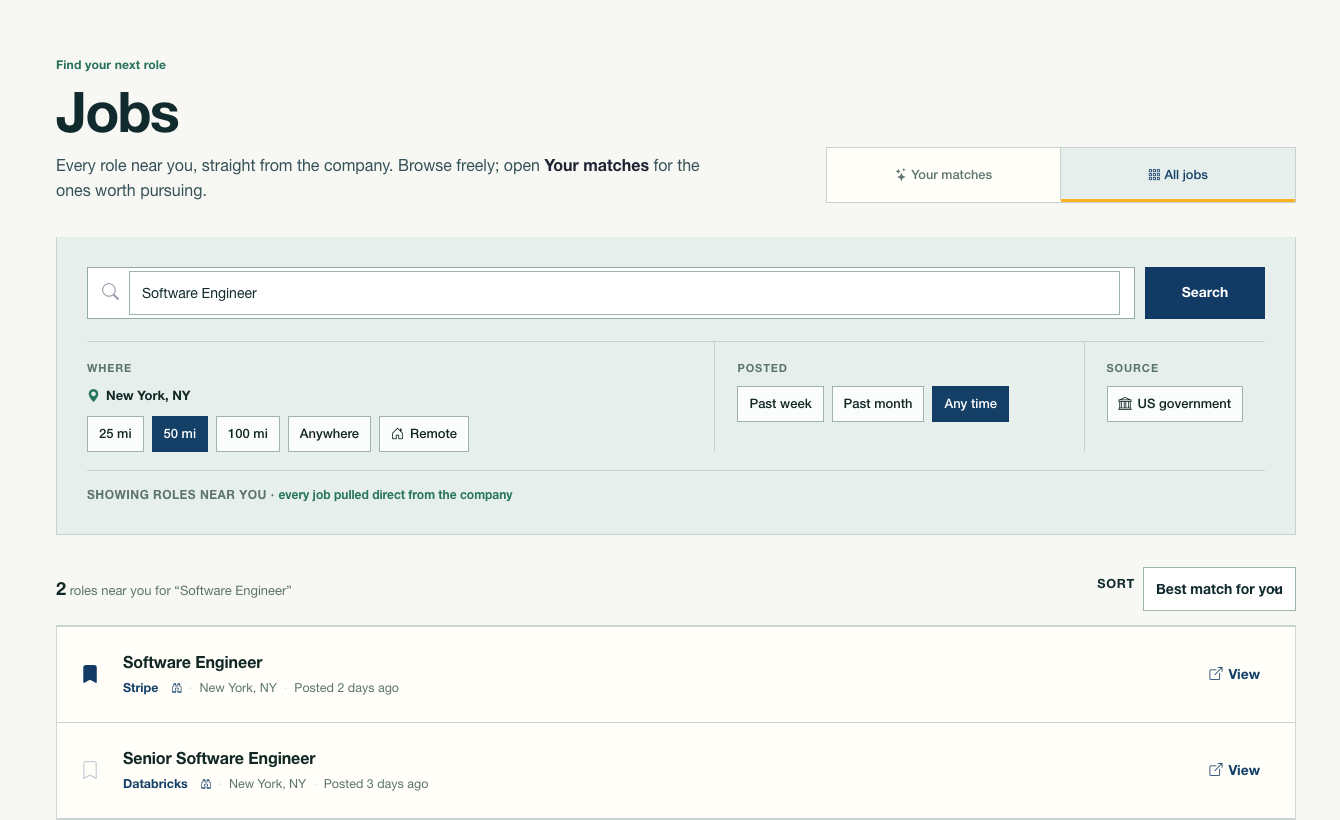
Profile matching and direct search share the same current job pool.
The full résumé workspace supports up to ten working résumés for different career directions. People can start from Profile and Insight, edit every section, choose from twelve role-oriented layouts, and see the document update in a live preview.
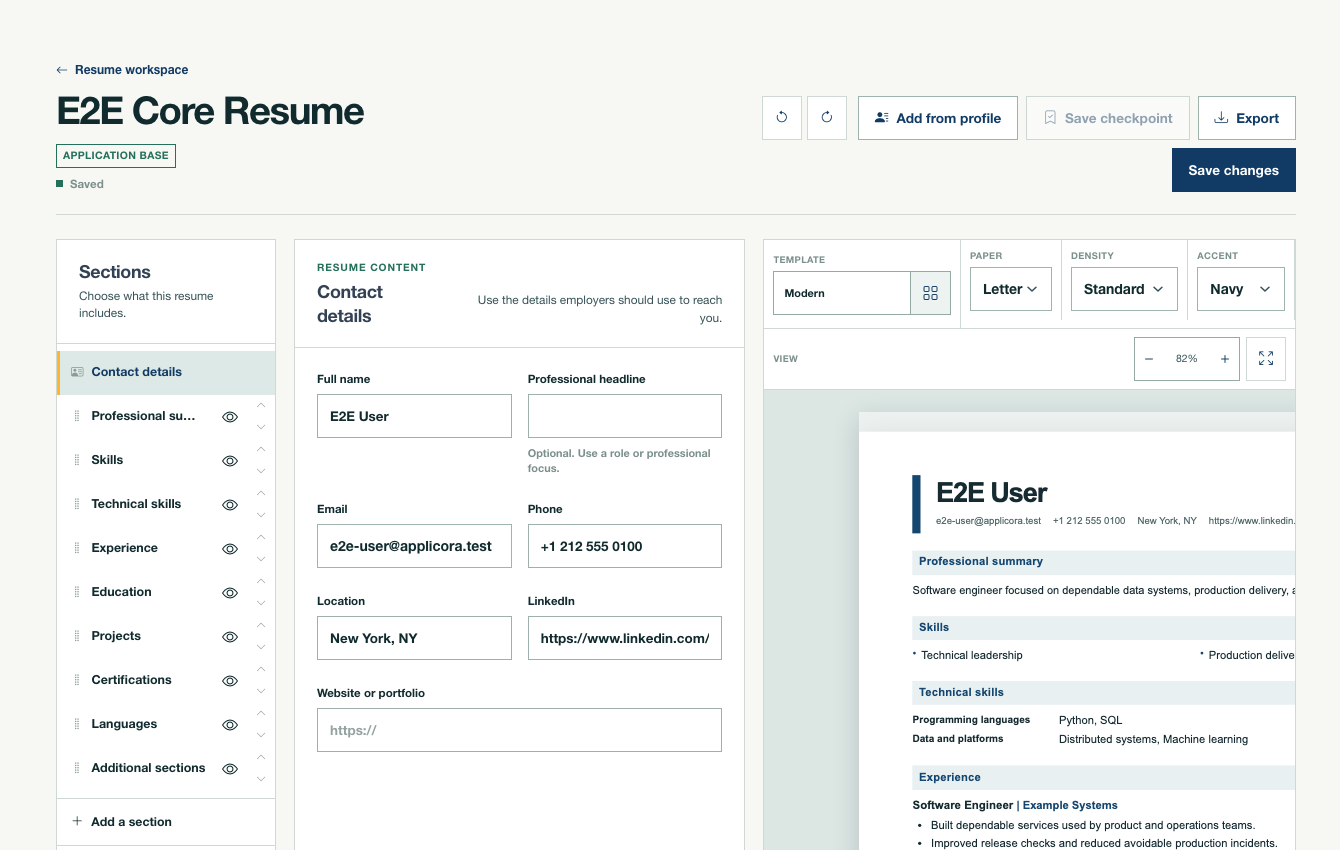
A complete résumé workspace, connected to the person’s profile and application flow.
A chosen base résumé can be tailored for one pursued role without changing the original. Fit analysis, application materials, status, files, dates, notes, interview preparation, and follow-up stay attached to the same opportunity.
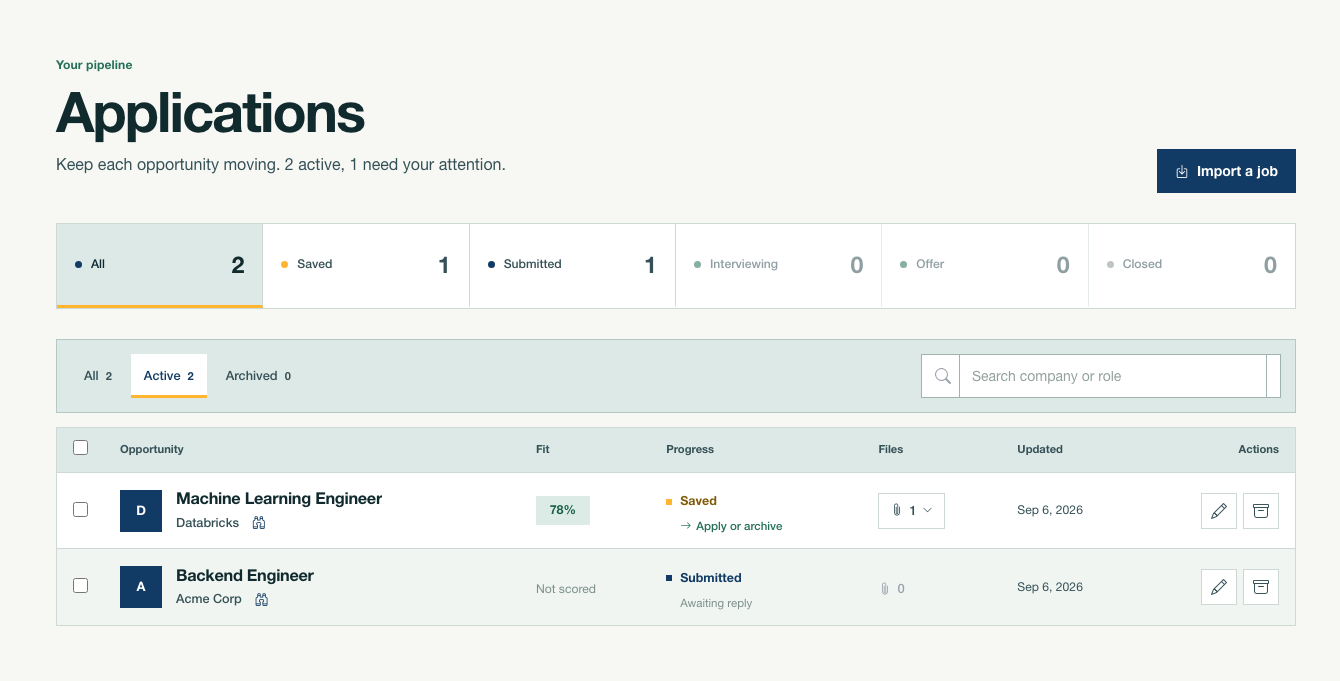
The application pipeline keeps every active opportunity and next step visible.
Upcoming: Career Knowledge Graph
The Career Knowledge Graph connects a person’s evidence with standardized skills, job titles, realistic next roles, and the development steps between them.
It is built on more than 1.2 million job descriptions and standardized occupation and labour-market datasets from Canada and the United States. It is currently in testing and is not yet generally available.